CASE STUDY
REMEDLY
Rebuilding a fragmented billing experience into a workflow-driven dashboard that reduces manual work and surfaces what matters most.
ROLE
UX Research & Product Design
PLATFORM
Desktop
DELIVERABLES
Research, Wireframes, Hi-Fi Prototype
OVERVIEW
Remedly's Revenue Cycle Management (RCM) module is the financial backbone of its medical practice platform — tracking every patient encounter from registration through claim submission and final payment. But the existing system couldn't keep up with how billers actually work.
I redesigned the Biller Dashboard and Billing Settings experience from the ground up: conducting domain research with internal and external billing teams, mapping the full claim lifecycle, and delivering a high-fidelity interactive prototype that reduced cognitive load, surfaced actionable priorities, and introduced critical missing features like ERA support and batch payment reconciliation.
Core challenge
Billing is not a linear process — it's iterative, exception-driven, and time-sensitive. The existing UI treated it like a static data table. The redesign treats it like a workflow command center.
PROBLEM STATEMENT
A system that failed billers at every turn
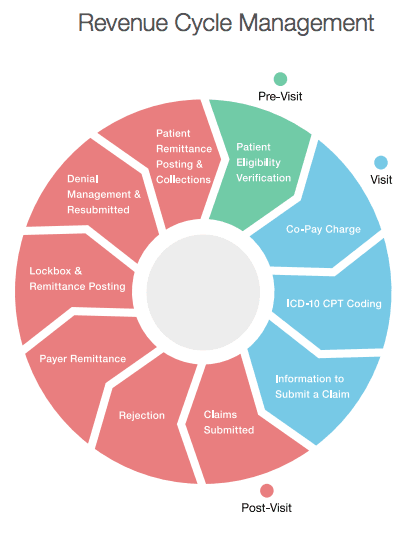
Revenue Cycle Management is the financial backbone of medical practices — tracking patient care from registration and scheduling through claim submission and final payment. Every delay in this chain means delayed revenue.
The existing RCM experience failed to support the full billing lifecycle required by modern medical practices. Core workflows were fragmented, difficult to manage at scale, and misaligned with how billers actually work — leading to inefficiencies, errors, and delayed revenue.
Pain Point 01
No claim type differentiation
Billers couldn't identify different claim types at a glance — everything looked the same regardless of status or urgency.
Pain Point 02
Missing ERA support
Electronic Remittance Advice wasn't supported at all, forcing billers into entirely manual reconciliation workflows.
Pain Point 03
Broken call-to-action buttons
Some existing CTA buttons inside the Biller Dashboard were non-functional, undermining trust in the entire system.
Pain Point 04
Multi-code entry not supported
Medical practices couldn't enter multiple diagnoses and CPT codes inside Patient Invoice and Chart Notes.
GOALS & SUCCESS METRICS
What success looked like.
The redesign had a clear mandate: build a Biller Dashboard and Billing Settings experience that doesn't just display data — it actively supports billers in doing their jobs faster and with fewer errors.
Business Goals
Support end-to-end billing workflows without external workarounds
Introduce high-impact billing features competitors already offered
Establish a scalable foundation for future RCM enhancements
Reduce reliance on manual processes and institutional knowledge
Users Goals
See claim status and next actions at a glance
Manage complex, exception-driven workflows with confidence
Apply batch payments and ERA without leaving the dashboard
Assign billers to specific billing stages
RESEARCH & DISCOVERY
Building a research foundation in an unfamiliar domain
Given my limited initial exposure to Revenue Cycle Management, I started by building a research foundation to deeply understand the domain before designing any solutions. Jumping to wireframes without this knowledge would have produced something that looked right but worked wrong.
Given my limited initial exposure to Revenue Cycle Management, I started by building a research foundation to deeply understand the domain before designing any solutions. Jumping to wireframes without this knowledge would have produced something that looked right but worked wrong.
Research Objectives
Understand what RCM is and how billers use it day to day
Identify billers' needs, pain points, and mental models
Analyze how existing medical software supports billing workflows
Methods
Interviews with internal and external billing teams — to ground findings in real practice, not assumptions
Full billing lifecycle walkthrough — from intake to claim resolution, documenting each step
Edge case and failure point documentation — cataloguing where the system broke down and what billers did to compensate
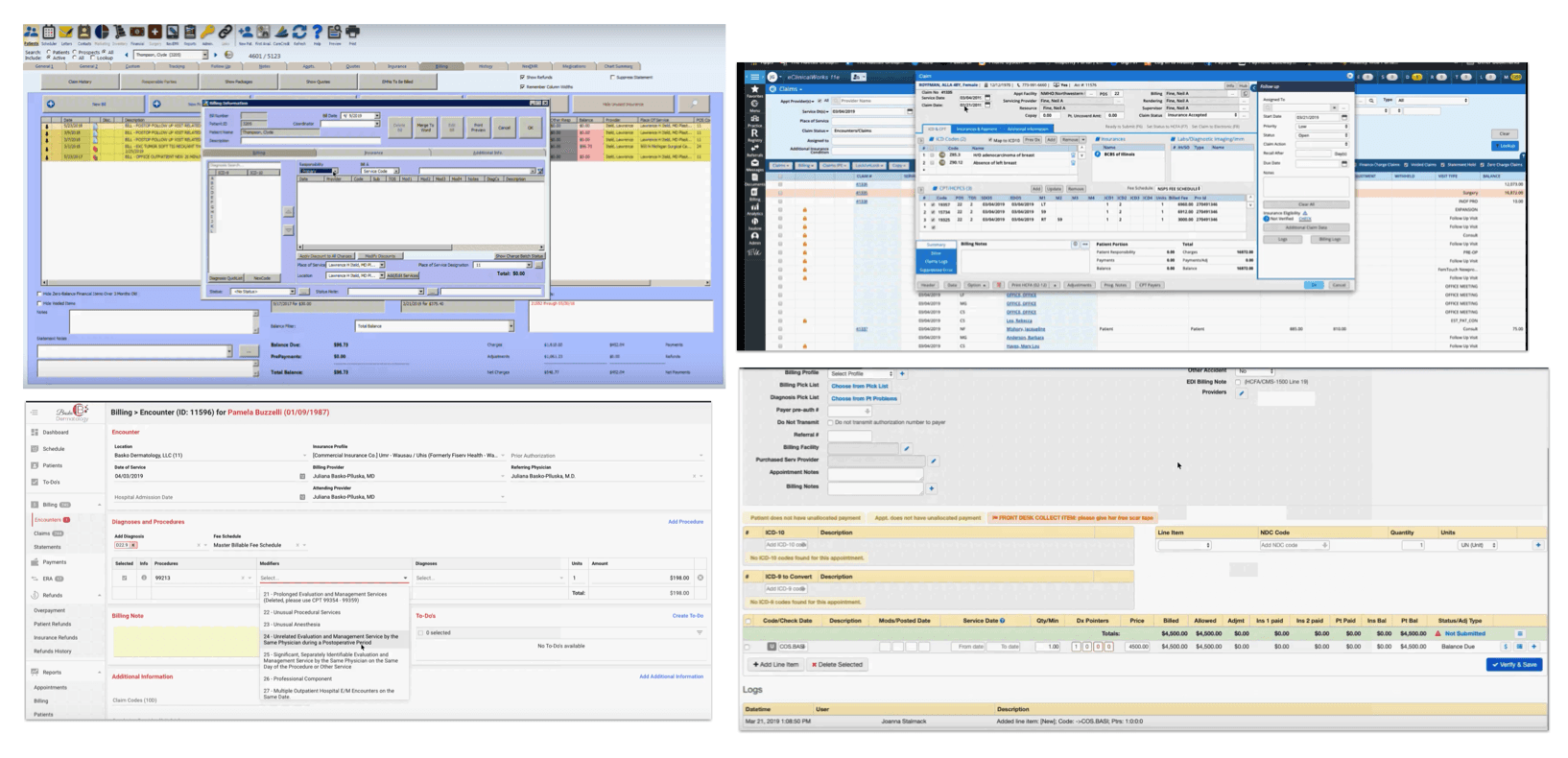
Competitive analysis — evaluating leading medical software platforms on claim management workflows, feature depth, information hierarchy, and error recover
IDEATION
From feature requests to workflow thinking
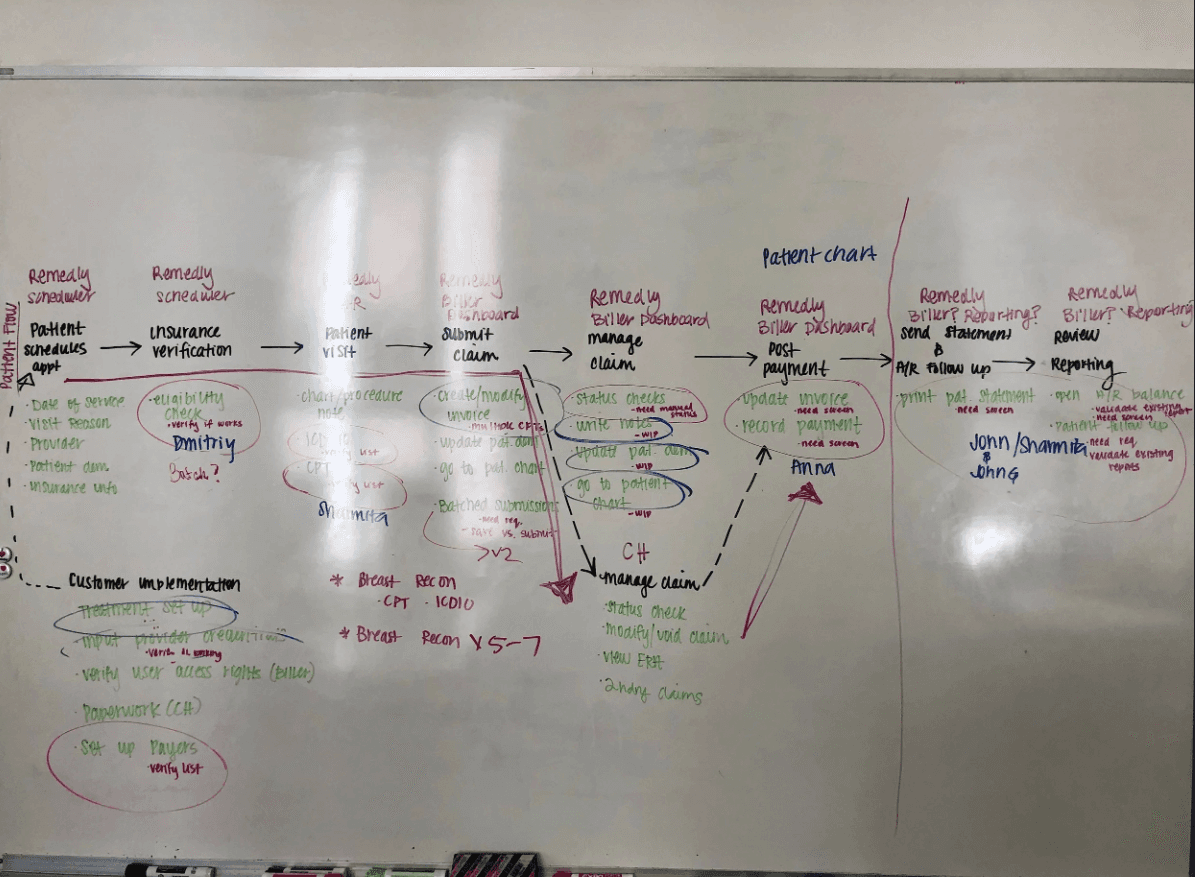
Armed with research, I resisted the pull to design features in isolation. Instead, I mapped the entire billing ecosystem first — understanding how every action connected to the next, and where the current system forced billers to context-switch unnecessarily. This step was instrumental in shifting the design from feature-based to workflow-driven.
Ideation Outcomes
Visualized how billing tasks interconnected across the system
Identified redundant steps and manual workarounds billers had normalized
Surfaced critical pain points and opportunities for automation
Established a priority hierarchy for which features to tackle first
USER FLOW & INFORMATION ARCHITECTURE
Mapping the full billing lifecycle
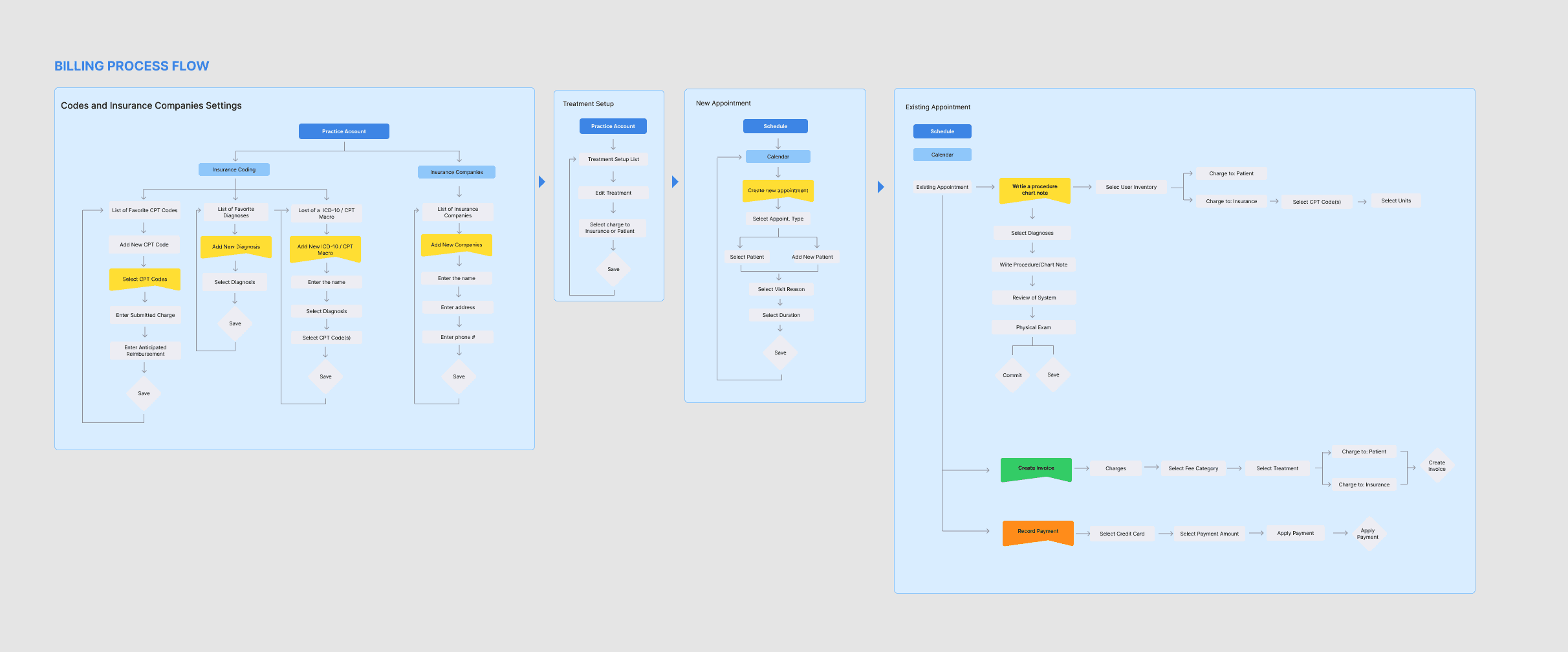
To fully understand Remedly's billing ecosystem, I created a detailed sitemap and process flows covering the entire billing cycle — from initial codes and insurance settings through new and existing appointments, all the way to payment reconciliation.
01
Codes & Insurance Settings
CPT codes, diagnoses, ICD-10 macros, and insurance company configuration.
02
Treatment Setup
Practice account setup, role assignment, and treatment parameters.
03
New Appointment
Scheduling, patient type, billing determination, and calendar entry.
04
Existing Appointment
Billing the encounter: diagnoses, CPT codes, procedure notes, and invoice creation.
05
Claim & Payment
Claim submission, status tracking, payment recording, and reconciliation.
DESIGN
A dashboard that communicates status at a glance
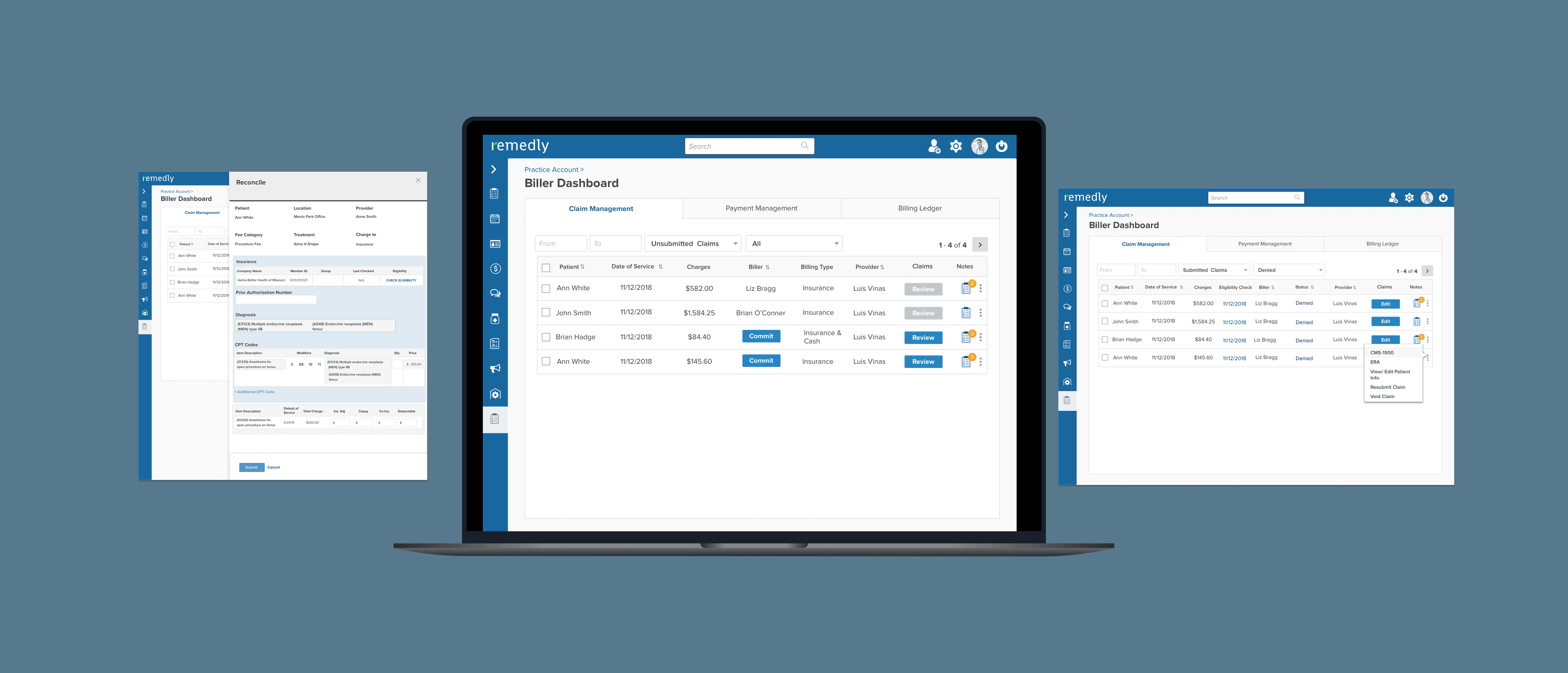
The final visual design for the Biller Dashboard prioritizes scanability. The redesign introduced a clean data table with clear status indicators — color-coded claim states (Approved, Pending, Modified, Not Submitted) and distinct action buttons for each workflow state.
BEFORE
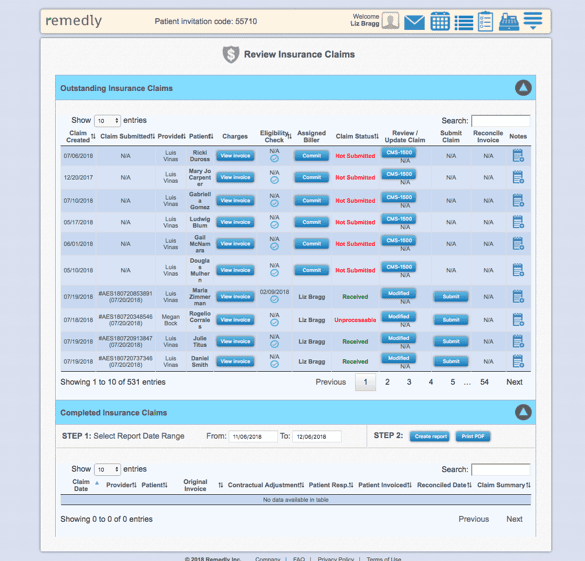
Dense table with 15+ columns
No visual claim type differentiation
Status shown only in text
Non-functional action buttons
Pagination through hundreds of rows
No biller assignment visible
AFTER
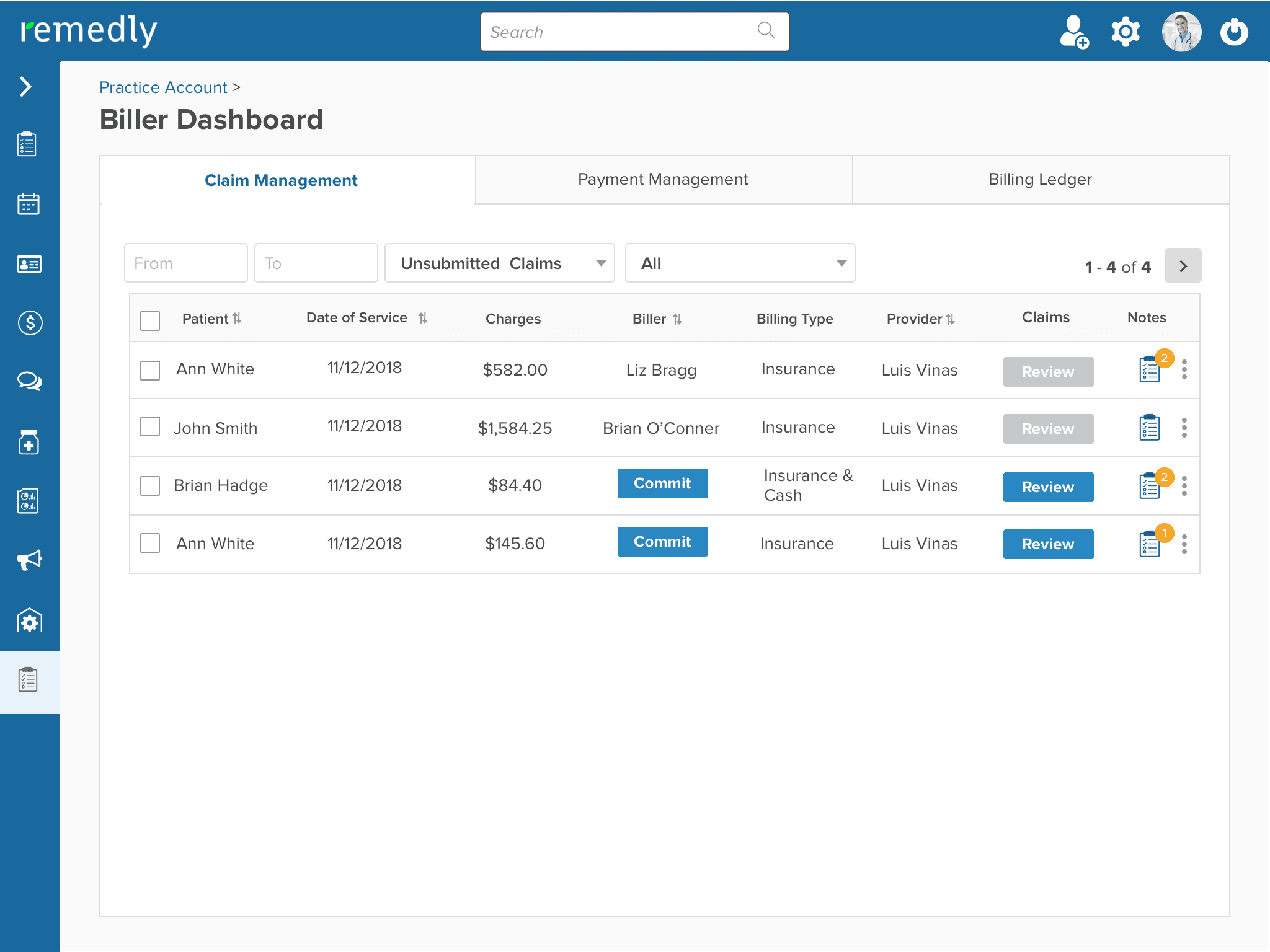
Filtered, focused claim queue
Color-coded status badges at a glance
Date range + claim type filters
Contextual Review / Commit actions per row
Biller and provider visible inline
Notes access directly from the row
DESIGN & WIREFRAMES
Task-focused wireframes for real billing scenarios
Using insights from research and flows, I designed wireframes focused on key billing tasks rather than system structure. Each screen was validated against actual biller workflows to ensure accuracy and compliance with medical billing conventions.
Design Principles
Reduce cognitive load for high-frequency tasks — billers shouldn't have to search for what to do next
Prioritize clarity and speed over density — the old system surfaced too much at once
Make system status and next actions immediately visible — surfacing exceptions, not just data
Support both novice and expert billers — power without complexity