CASE STUDY
EHEALTH INSURANCE
Personalized
Eligibility tool
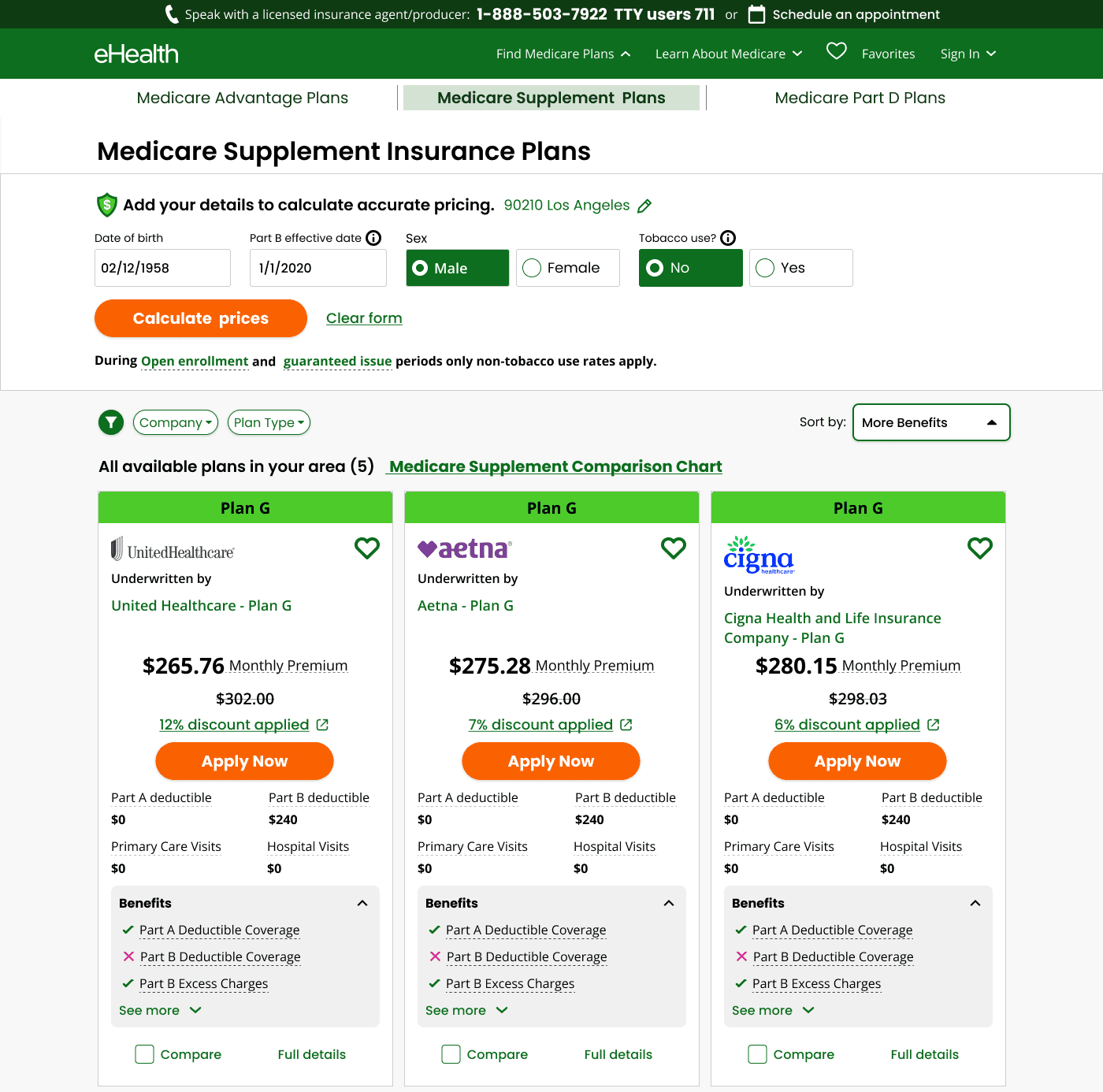
Designed a personalized eligibility tool that put transparency before data collection.
Working closely with Product, Marketing, Engineering, Compliance, and stakeholders, I helped shape a new shopping model — one built around trust, clarity, and informed decision-making before enrollment.
53%
YoY increase in personalized quote starts & conversions
ROLE
Lead Designer
TEAM
PM, Developers, Research, Stake holders
UX DESIGN
CASE STUDY
EHEALTH INSURANCE
EHEALTH INSURANCE
Personalized Eligibility Tool
Designed a personalized eligibility tool that put transparency before data collection.
Working closely with Product, Marketing, Engineering, Compliance, and stakeholders, I helped shape a new shopping model — one built around trust, clarity, and informed decision-making before enrollment.
Designed a personalized eligibility tool that helped shoppers understand their options before sharing personal information.
Personalized
Eligibility
Tool
Making Medicare Supplement pricing feel accurate, transparent, and easy to understand - so shoppers can compare
53%
YoY increase in personalized
quote starts & conversions
100%
Participant form
comprehension rate
ROLE
Lead Designer
YEAR
2025
COMPANY
eHealth Insurance
ROLE
Lead Designer
PLATFORM
Desktop, Tablet
TEAM
Product, Engineering, Research, Compliance, Marketing, Developers, Research, Stake holders
ROLE
Lead Designer
PLATFORM
Desktop, Tablet
TEAM
Product, Engineering, Research, Compliance, Marketing, Developers, Stake holders
ROLE
Lead Designer
PLATFORM
Desktop, Tablet
TEAM
Product, Engineering, Research, Compliance, Marketing, Developers, Stake holders

53%
YoY increase in personalized quote starts & conversions
ROLE
Lead Designer
PLATFORM
Desktop, Tablet
TEAM
Product, Engineering, Research, Compliance, Marketing, Developers, Stake holders
53%
YoY increase in personalized quote starts & conversions
OVERVIEW
OVERVIEW
A trust gap built into the default experience
Medicare Supplement shoppers visit the Quotes page to understand what their coverage will actually cost. But the legacy experience showed the lowest possible price before users entered key details like date of birth, tobacco use, or household discount eligibility.
This created a painful gap between what users expected and what the system showed — eroding trust and creating friction at the very start of the shopping journey.
Medicare Supplement shoppers visit the Quotes page to understand what their coverage will actually cost. But the legacy experience showed the lowest possible price before users entered key details like date of birth, tobacco use, or household discount eligibility.
This created a painful gap between what users expected and what the system showed - eroding trust and creating friction at the very start of the shopping journey.
Medicare Supplement shoppers visit the Quotes page to understand what their coverage will actually cost. But the legacy experience showed the lowest possible price before users entered key details like date of birth, tobacco use, or household discount eligibility.
This created a painful gap between what users expected and what the system showed - eroding trust and creating friction at the very start of the shopping journey.
PROBLEM 01
Generic "as low as" pricing
Generic "as low as" pricing
Default quotes showed lowest-possible prices, which never matched what users paid after entering real details.
Default quotes showed lowest-possible prices, which never matched what users paid after entering real details.
PROBLEM 02
Census data trapped in a modal
Census data trapped in a modal
Personalization was collected via a pop-up that interrupted the browsing flow rather than being embedded naturally.
Personalization was collected via a pop-up that interrupted the browsing flow rather than being embedded naturally.
PROBLEM 03
Household discounts invisible
Household discounts invisible
Significant savings (up to 12%) were buried, with users entirely unaware they might qualify.
PROBLEM 01
Generic "as low as" pricing
Default quotes showed lowest-possible prices, which never matched what users paid after entering real details.
PROBLEM 02
Census data trapped in a modal
Personalization was collected via a pop-up that interrupted the browsing flow rather than being embedded naturally.
PROBLEM 03
Household discounts invisible
Significant savings (up to 12%) were buried, with users entirely unaware they might qualify.
PROBLEM
The modal blocked comparison before it created value.
Shoppers needed to share sensitive details before they could see accurate prices - at the exact moment trust was lowest.
The modal blocked comparison before it created value.
Shoppers needed to share sensitive details before they could see accurate prices - at the exact moment trust was lowest.


RESEARCH & METHODOLOGY
DESIGN EXPLORATION
Explore first, share details later.
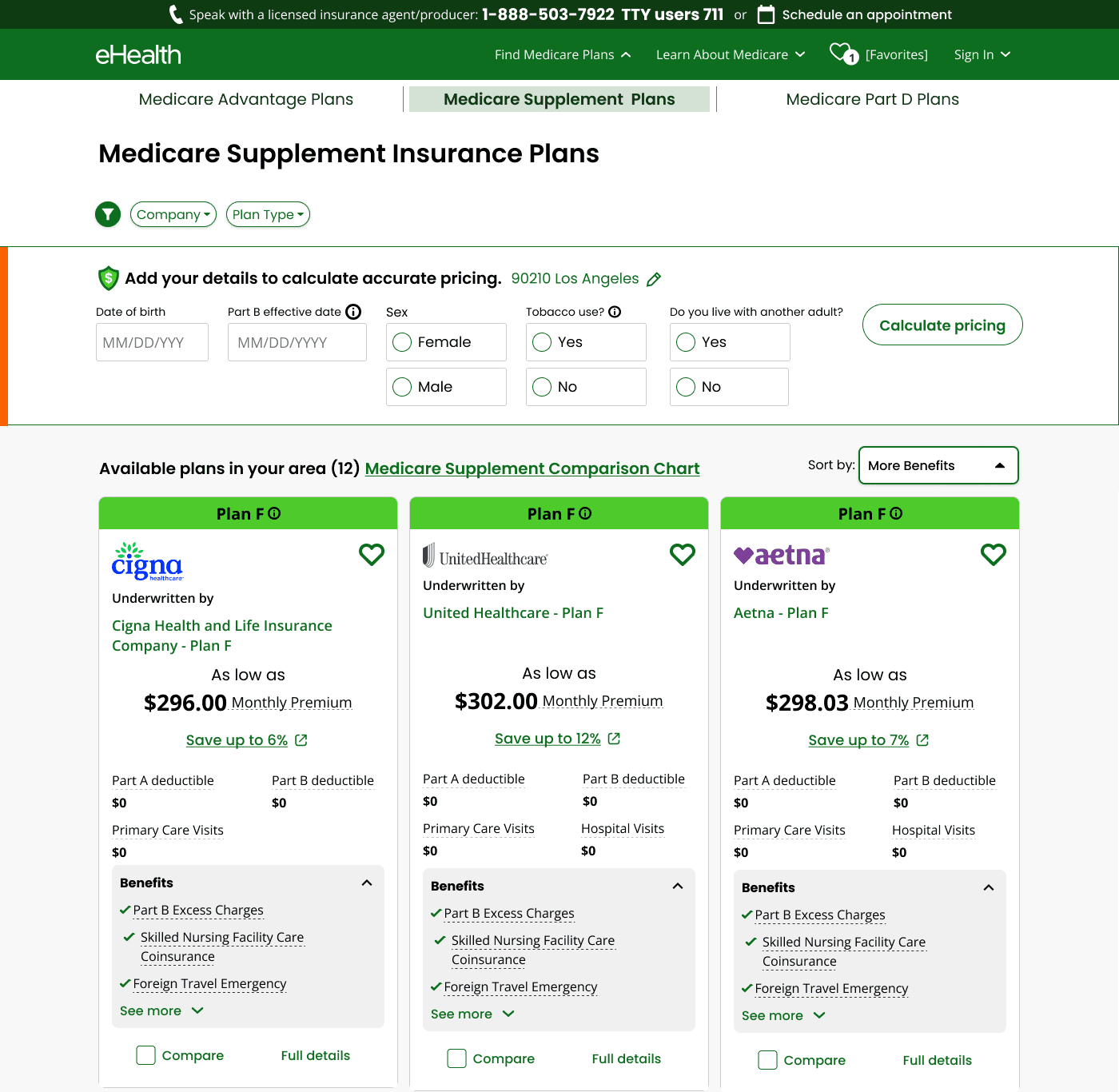
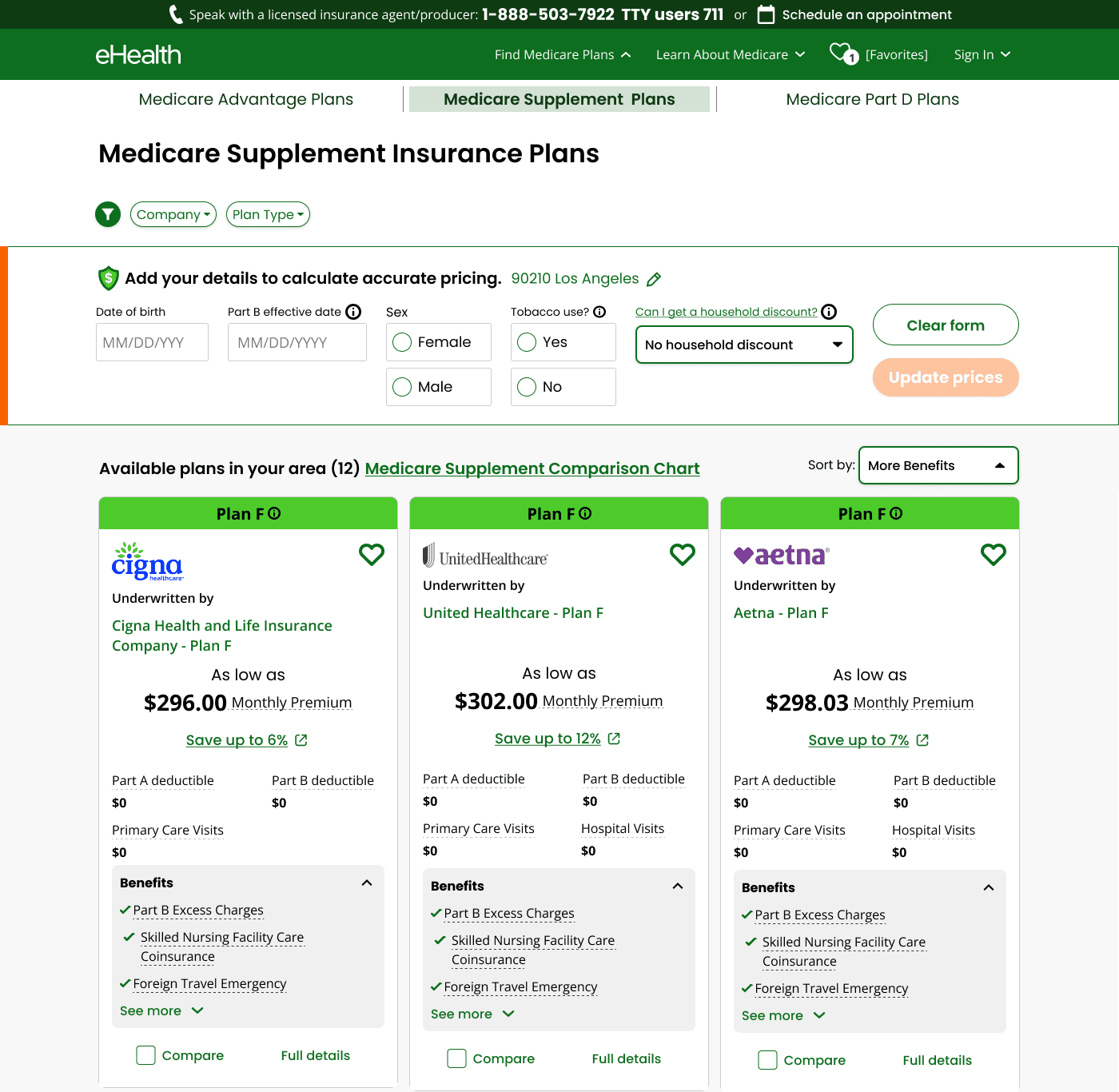
Most Medicare Supplement sites ask for your date of birth, ZIP and tobacco status before showing a single plan. Here, every plan in your area is visible from the start. The pricing form lives inside the page and only refines the numbers you're already looking at. Both variants keep that principle and change one thing: how the household question is asked.
A trust gap built into the default experience
Explore first, share details later.
Most Medicare Supplement sites ask for your date of birth, ZIP and tobacco status before showing a single plan. Here, every plan in your area is visible from the start. The pricing form lives inside the page and only refines the numbers you're already looking at. Both variants keep that principle and change one thing: how the household question is asked.
Variant 01
Variant 01
Variant 01
With household as a radio buttons - CTA on the right
Variant 01
Variant 02
Variant 01
Variant 02
With household as a dropdown - CTA on the right
RESEARCH
Unmoderated testing on real devices
Unmoderated testing on real devices
I partnered with research to run an unmoderated remote usability test, letting us observe natural scrolling behavior, attention patterns, and trust signals in context.
I partnered with research to run an unmoderated remote usability test, letting us observe natural scrolling behavior, attention patterns, and trust signals in context.
20
20
20
PARTICIPANTS
PARTICIPANTS
2
2
2
PROTOTYPE TESTED
PROTOTYPE TESTED
3
3
3
KEY TESTS
KEY TESTS
01
STUDY DESIGN
STUDY DESIGN
Unmoderated Remote Sessions
Participants used their own desktop devices, ensuring authentic interaction patterns with no observer effect influencing their behavior.
02
VARIANYS TESTING
VARIANTS TESTING
Two Dynamic Prototypes
eHealth design vs. Medicare.gov-inspired design — each fully interactive with live price updates on form completion.
eHealth design vs. Medicare.gov-inspired design, each fully interactive with live price updates on form completion.
03
SAMPLE
SAMPLE
N=20 Participants
Current Medicare Supplement beneficiaries (N=8) and NTMs with Part A & B (N=12). Average age 67–68. Multiple states including TX, FL, CA, MI, IL.
04
KEY TEST 01
KEY TEST 01
H2 Comprehension
Evaluated whether the subheading improved users' understanding of the census section's purpose with and without the headline.
05
KEY TEST 02
KEY TEST 02
Household Discount Clarity
Assessed users' understanding of eligibility across the question wording, dropdown label, and tooltip interaction.
06
KEY TEST 03
KEY TEST 03
CTA Placement & Hierarchy
Evaluated how placement and visual hierarchy affected interaction with "Clear Form" and "Update Prices" buttons.
DESIGN PROCESS
A lifecycle built for regulated complexity
Medicare Supplement enrollment isn't just a UX problem — it's a compliance problem. The design process had to accommodate carrier stakeholders, legal review cycles, and underwriting rules alongside standard UX iteration loops. I structured the work as an interconnected lifecycle rather than a linear waterfall: discovery and compliance alignment ran in parallel, and stakeholder reviews were embedded throughout rather than saved for the end.
Product Development Lifecycle
FINDINGS
FINDINGS
Four minor issues, zero critical ones
Four minor issues, zero critical ones
Four minor issues, zero critical ones
No critical or major usability issues were detected. The form was described as discoverable, intuitive, and easy to use — 100% of participants understood its purpose immediately.
No critical or major usability issues were detected. The form was described as discoverable, intuitive, and easy to use - 100% of participants understood its purpose immediately.

01
Household discount
Copy unclear; tooltip not discoverable; not differentiated from plan card tooltips.
02
System response
It wasn't always evident prices changed after clicking Calculate.
03
Distractions
"Clear form" above primary CTA caused accidental resets and buried the main action.
04
Trust
Concern about sharing date of birth before shopping.
01
Household discount
Copy unclear; tooltip not discoverable; not differentiated from plan card tooltips.
02
System response
It wasn't always evident prices changed after clicking Calculate.
03
Distractions
"Clear form" above primary CTA caused accidental resets and buried the main action.
04
Trust
Concern about sharing date of birth before shopping.
In there own worlds
"
"You can get a more accurate price by putting in your age, sex, and health — and see if you qualify for a discount."
New to Medicare shopper
LOW FREQUENCY OF OCCURRENCE
HIGH FREQUENCY OF OCCURRENCE
01
FREQUENCY
IMPACT
Trust / DOB
Concern about sharing date of birth before shopping.
BOTH VARIANTS
02
FREQUENCY
IMPACT
System response
It wasn't always evident prices changed after clicking Calculate.
BOTH VARIANTS
03
FREQUENCY
IMPACT
Distractions
"Clear form" above primary CTA caused accidental resets and buried the main action.
BOTH VARIANTS
04
FREQUENCY
IMPACT
Household discount
Copy unclear; tooltip not discoverable; not differentiated from plan card tooltips.
BOTH VARIANTS
03
HIGH PRIORITY
02, 04
MEDIUM PRIORITY
01
LOW PRIORITY
In there own worlds
In there own worlds
"
"It's helping to categorize me and then it will adjust the cost of the plans accordingly."
Current beneficiary
"
"
"You can get a more accurate price by putting in your age, sex, and health — and see if you qualify for a discount."
"You can get a more accurate price by putting in your age, sex, and health — and see if you qualify for a discount."
New to Medicare shopper
"
"You can get a more accurate price by putting in your age, sex, and health — and see if you qualify for a discount."
New to Medicare shopper
"
"I can put in my demographics, so to speak, and click calculate pricing and it'll give me more accurate pricing."
New to Medicare shopper
DESIGN DECISIONS
DESIGN DECISIONS
DESIGN DECISIONS
Research translated into concrete design
Research translated into concrete design
Each usability issue was mapped directly to a design change, ensuring every decision had a user-research rationale.


01
SYSTEM RESPONSE
KEY FINDINGS
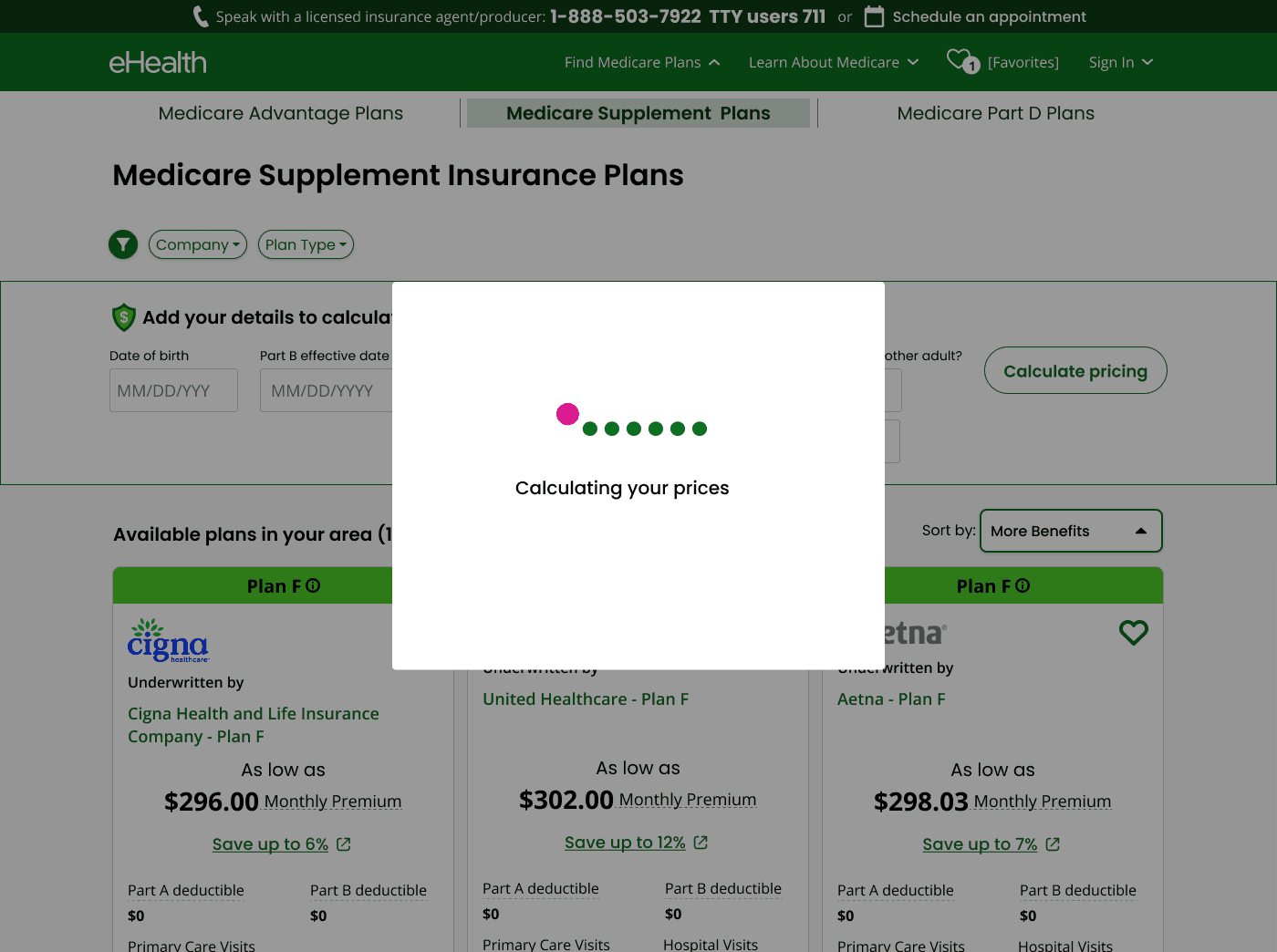
System response was invisible to users
Users didn't notice prices updated after clicking "Calculate pricing." Without clear feedback, they doubted whether their inputs had taken effect.
DESIGN DECISION
Loading modal with clear system feedback
Added "Calculating your price" modal with animated indicator
Unambiguous feedback while prices recalculate
Sets expectation that results are personalized, not generic
02
HOUSEHOLD DISCOUNT
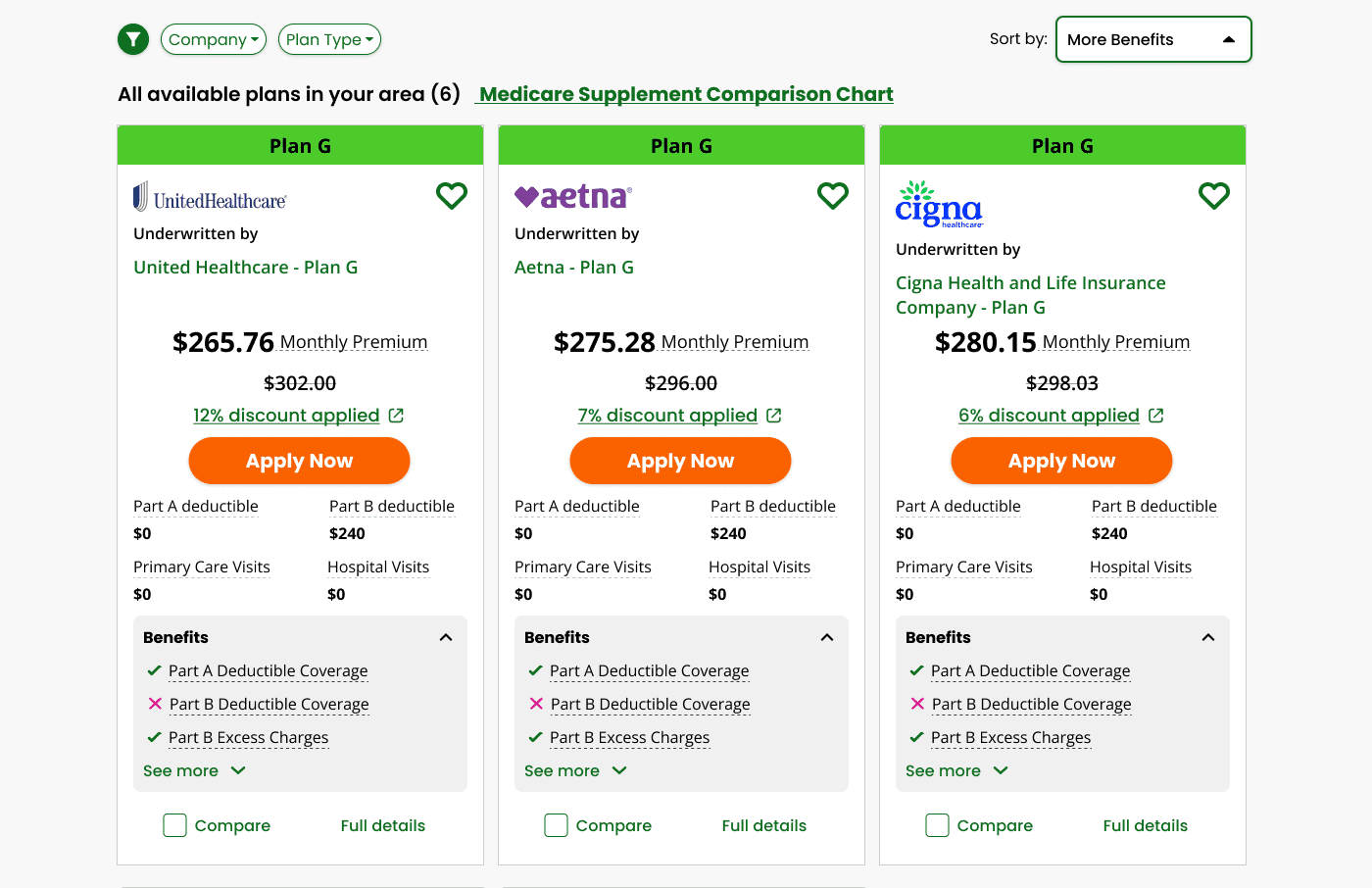
KEY FINDINGS
KEY FINDINGS
Household discount eligibility was confusing
Ambiguous wording, unclear labels, and tooltips users never clicked created widespread confusion about whether savings applied to them.
DESIGN DECISION
Backend-driven automatic discount logic
Backend logic calculates discounts automatically in real time
Removed burden of eligibility decisions from users
Discount percentage now surfaces directly on plan cards
03
PAGE DISTRACTION
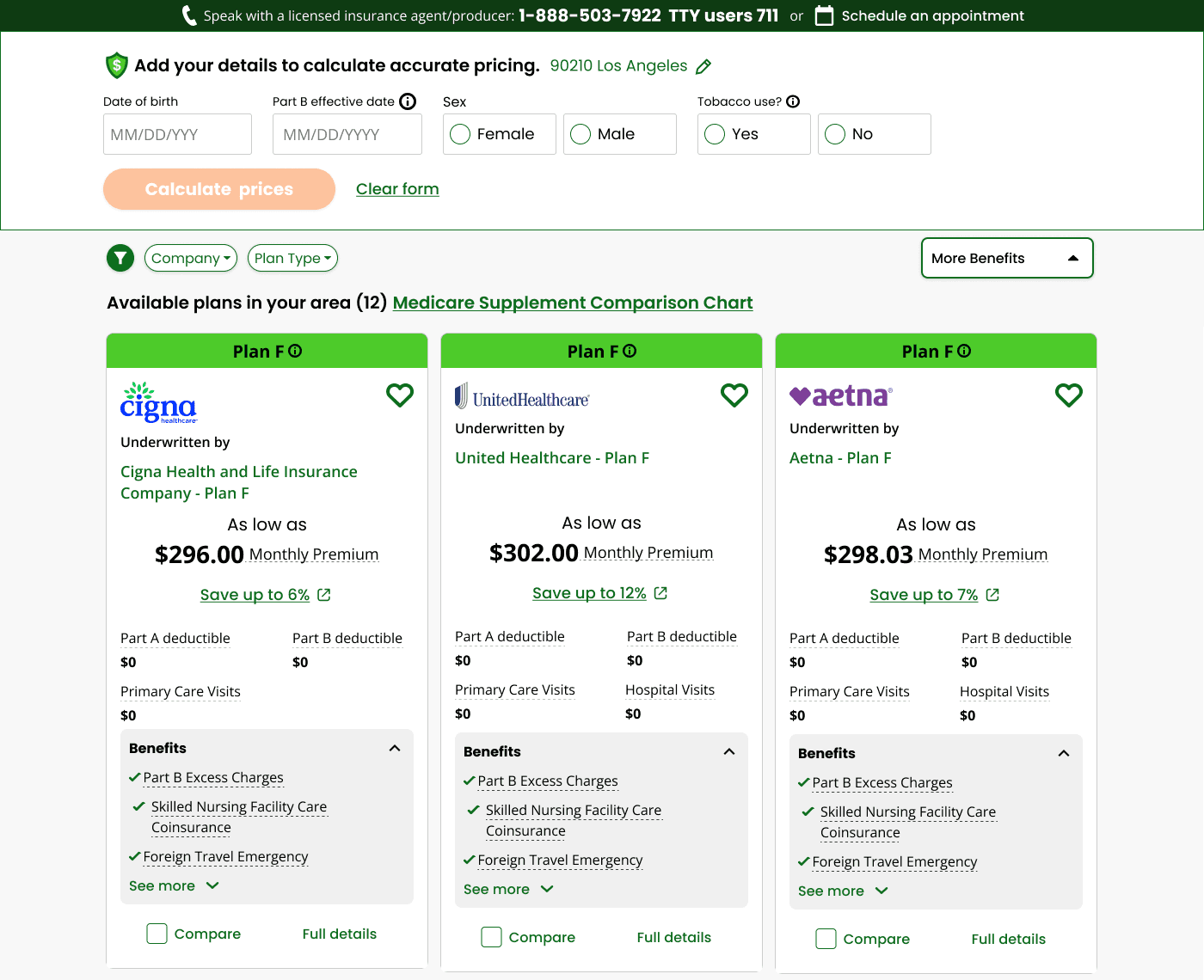
Distractions pulled attention from the form
Filters above the census caused form abandonment. The "Clear Form" button near the primary CTA caused accidental resets and buried the main action.
Improved census visibility & CTA hierarchy
Moved filters below the form to eliminate distraction
Anchored census section at the top of the page
Primary CTA moved to bottom, out of users' blind spots
Clear visual hierarchy between primary and secondary actions
04
TRUST/DATE OF BIRTH
KEY FINDINGS
DOB created anxiety in low-trust users
Two participants with low brand familiarity hesitated to provide their exact date of birth before seeing any plans, creating early funnel friction.
DESIGN DECISION
DESIGN DECISION
Show results first, personalize second
Plans visible by default without requiring personal data upfront
Census positioned as an optional accuracy enhancer, not a gate
Copy reframed: "Add your details to calculate accurate pricing"
RESULTS & IMPACT
RESULTS & IMPACT
RESULTS & IMPACT
The design delivered
The design delivered
+53%
Year-over-year increase in personalized quote starts and conversions
53%
100%
Year-over-year increase in personalized quote starts and conversions
Of participants immediately understood the form's purpose without guidance
0
Critical or major usability issues detected during prototype testing
100%
Of participants immediately understood the form's purpose without guidance
0
Critical or major usability issues detected during prototype testing
Personalized Eligibility Tool
eHealth Insurance
2025