


eHealth · Healthcare e-commerce

Medicare Supplement shopping & online enrollment

I designed the experience that helps people understand their options, compare plans across carriers, and get pricing based on their needs.

296%
YoY growth in Medicare Supplement online enrollment (OLU) conversions
46 states
With fully digital enrollment
126 plans
Available online (+24.75% YoY)
99 plans
With online applications (79% of total)
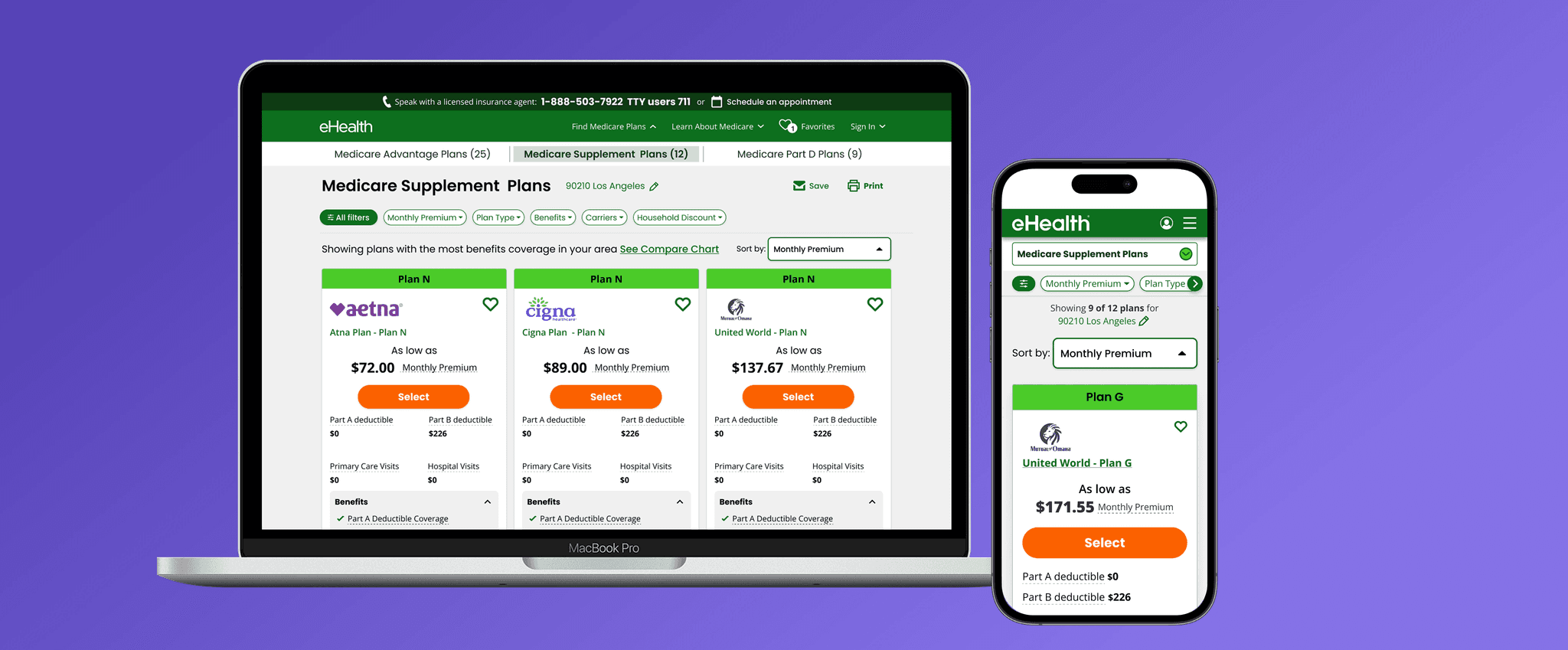
Medicare Supplement plan comparison screens
Role
Lead Designer
Platform
Desktop, Tablet, Mobile
Team
Product, Engineering, Carriers, Compliance, Marketing, Legal
Partners
Cigna, Aetna, Mutual of Omaha, Anthem & others

Overview

Choosing Medicare coverage is a high-stakes decision

Shoppers must understand the difference between Medicare Supplement and Medicare Advantage, then choose a plan, carrier, and price that fit their needs.

eHealth offered plans from national and regional carriers, with standardized Medicare Supplement plan types across 47 states. But the shopping experience didn’t make those options easy to understand or compare.

Problem

Traffic wasn’t the problem. Decision support was.

People needed a clearer path from understanding their coverage options to comparing available plans and getting a personalized price.

Goal

A clearer way to shop for Medicare Supplement plans

Help shoppers see which Medicare Supplement plans are available in their area, compare options side by side, and get accurate pricing based on their personal information.

01 DiscoverResearch

Shoppers needed clarity before they could compare

We benchmarked competitor experiences and Medicare.gov, then mapped the shopping journey. Research included 30-minute interviews with people new to Medicare and people switching plans, stakeholder input, and findings from eHealth’s 2017–2023 Medicare Shopping & Switching Study.

15
30-minute interviews with people new to Medicare and people switching plans
2017–2023
Findings from eHealth’s Medicare Shopping & Switching Study
Medicare.gov
Benchmarked alongside competitor shopping experiences

What we learned

People needed clarity

Shoppers wanted to understand how coverage options differed before comparing individual plans.

Price needed context

A useful quote depended on personal details and eligibility, not just a starting price on a plan card.

Comparison needed focus

Shoppers needed a consistent way to compare plan types and carriers without getting lost in filters and details.

Who we designed for

From the interviews and external research, the team defined a Medicare Supplement persona and the customer groups who benefit most.

Persona

Medicare Supplement shopper

66 · Sonoma, CA · College degree

  • Travels
  • Budget-conscious
  • Health needs
“I had a surgery a year ago. There were complications… So, I want to pick something that I know will cover for everything.”

How she shops

Does her own research across several sites: ones her employer or association recommends, Medicare.gov, and family and friends.

Learning journey

Started browsing websites a year before signing up for Medicare.

Her questions

  • What happens if I delay signing up for Medicare?
  • What’s the difference between Medicare Supplement and Medicare Advantage?

What drives her

  • “I am not a risky person. I want to insure myself for every scenario.”
  • The insurer she wants doesn’t have her doctors in network.
  • Household income is tight, and she wants full coverage without out-of-pocket costs.

Six groups who benefit most

  • Rural & small city
  • Budgeters
  • Travelers
  • Financially comfortable
  • New to Medicare
  • Women

User journey

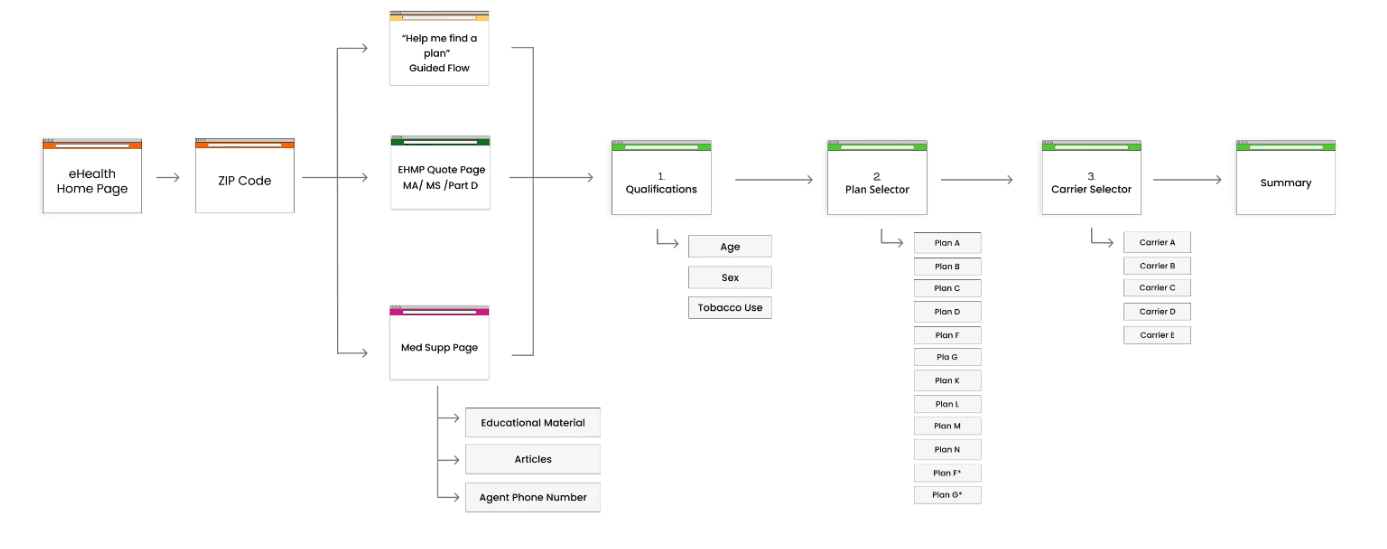
Medicare shopping user journey map, from the eHealth home page and ZIP code through qualifications, plan selector, and carrier selector to summary
See the competitive research5 shopping flows · 3 shopper questions · pricing deep dive

We walked through five Medicare Supplement shopping flows step by step: Medicare.gov and four carriers.

  1. Medicare.govGovernment
    1. Cover page
    2. Basic info
    3. Results
    4. Plan policies
  2. AARPCarrier · UnitedHealthcare
    1. Quotes page
    2. Basic info
    3. Plan details
    4. Compare
  3. CignaCarrier
    1. Agent assistance
    2. Advantages of Medicare Supplement
  4. AnthemCarrier
    1. Cover page
    2. Basic info
    3. Estimated number of options
    4. Plan cards
    5. Compare
  5. HumanaCarrier
    1. See plans or request a call
    2. Basic info
    3. Quotes
    4. Plan summary
    5. Doctors & hospitals
    6. Prescriptions
    7. Rates by age & gender

Three questions every shopper answers

Shoppers

Who’s shopping?

  • New to Medicare
  • On Parts A & B only
  • Switching Med Supp plans
01

Why eHealth?

  • Unbiased advisors
  • Wide plan selection
  • Trusted expertise
  • Easy to use
02

Why Medicare Supplement?

  • Choose any doctor
  • Anywhere in the US
  • No referrals
03

Why this plan?

  • Competitive prices & low copays
  • Comprehensive benefits & add-ons
  • Clear rules & restrictions

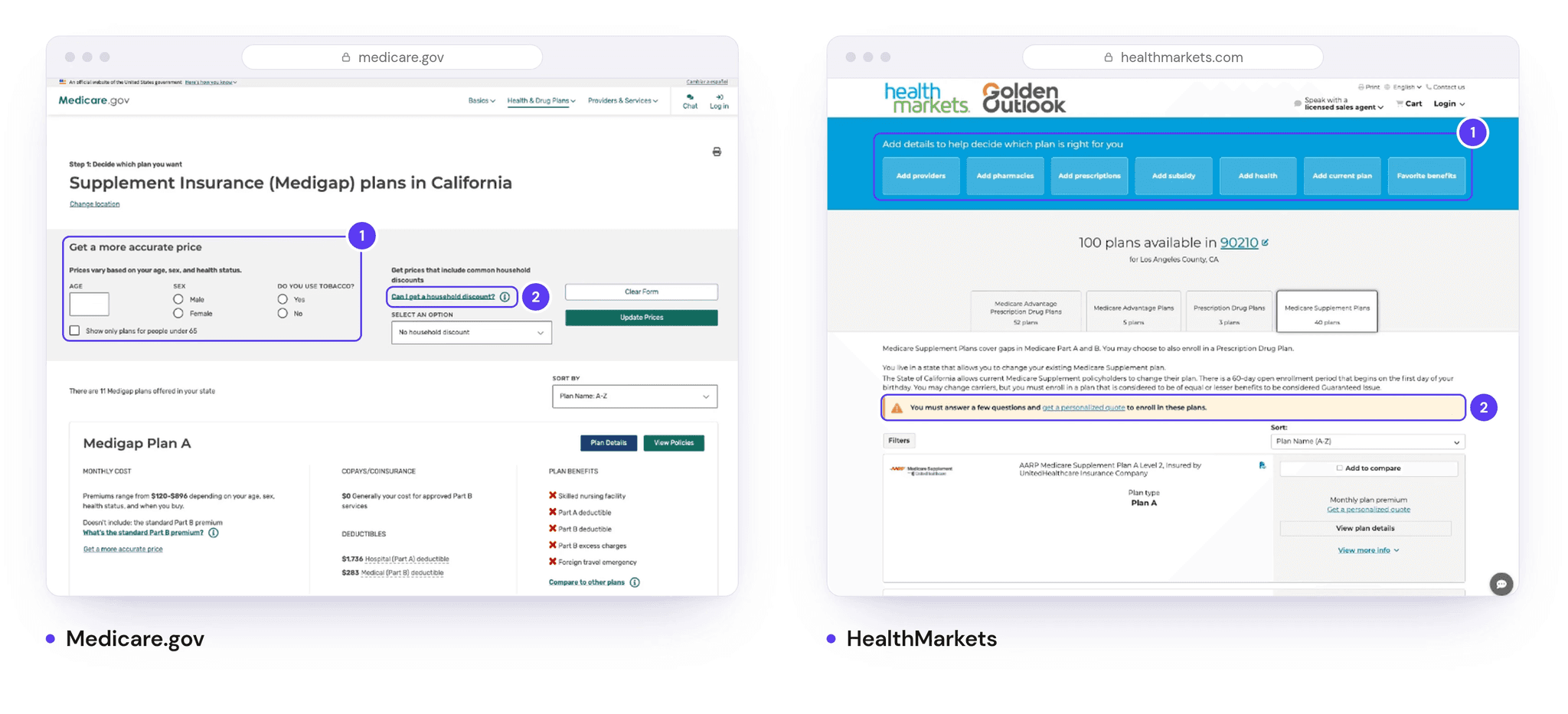
Deep dive · How competitors handle personalized pricing

Competitive analysis of personalized pricing on Medicare.gov and HealthMarkets

02 DefineDesign foundations

Designing for clarity within a regulated experience

The experience was designed for shoppers who needed to understand complex coverage and pricing, including people new to Medicare. I partnered with Product, Compliance, Legal, and carrier teams to present plan and eligibility information clearly and accurately.

Partnered with

  • Product
  • Compliance
  • Legal
  • Carrier teams

Non-negotiable 01

Accessibility & readability

Make plan details easier to read, understand, and compare.

Non-negotiable 02

Compliance

Keep plan, eligibility, pricing, and required disclosure information aligned with approved guidance.

Our guiding principles

Transparency

Make plan coverage, eligibility, and pricing easy to understand.

Trust

Show accurate, personalized prices and explain what affects them.

Decision clarity

Help shoppers compare options and focus on the next step.

03 Explore & testUser testing

Three pricing-flow concepts, tested with shoppers 65+

We tested early pricing-flow concepts with five adults aged 65+ in 30-minute sessions. I focused on whether people understood what information they needed to provide and how they would compare plan options.

The sessions helped identify where the experience needed more clarity. I used those insights to refine the flow before moving into the final design.

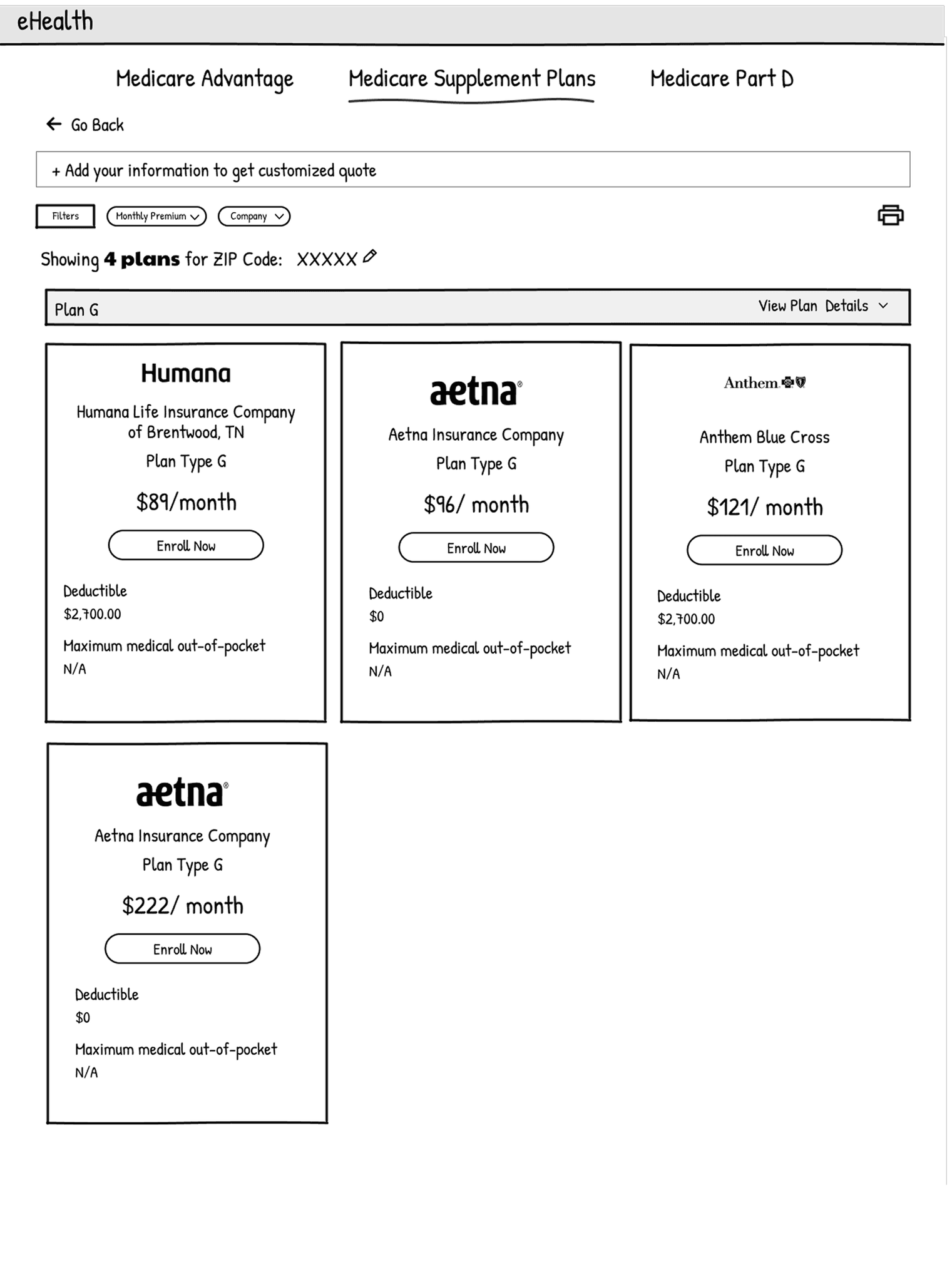
Concept 1: plan-first cards
01

Plan-first cards

Users select a plan type, then compare carriers and prices.

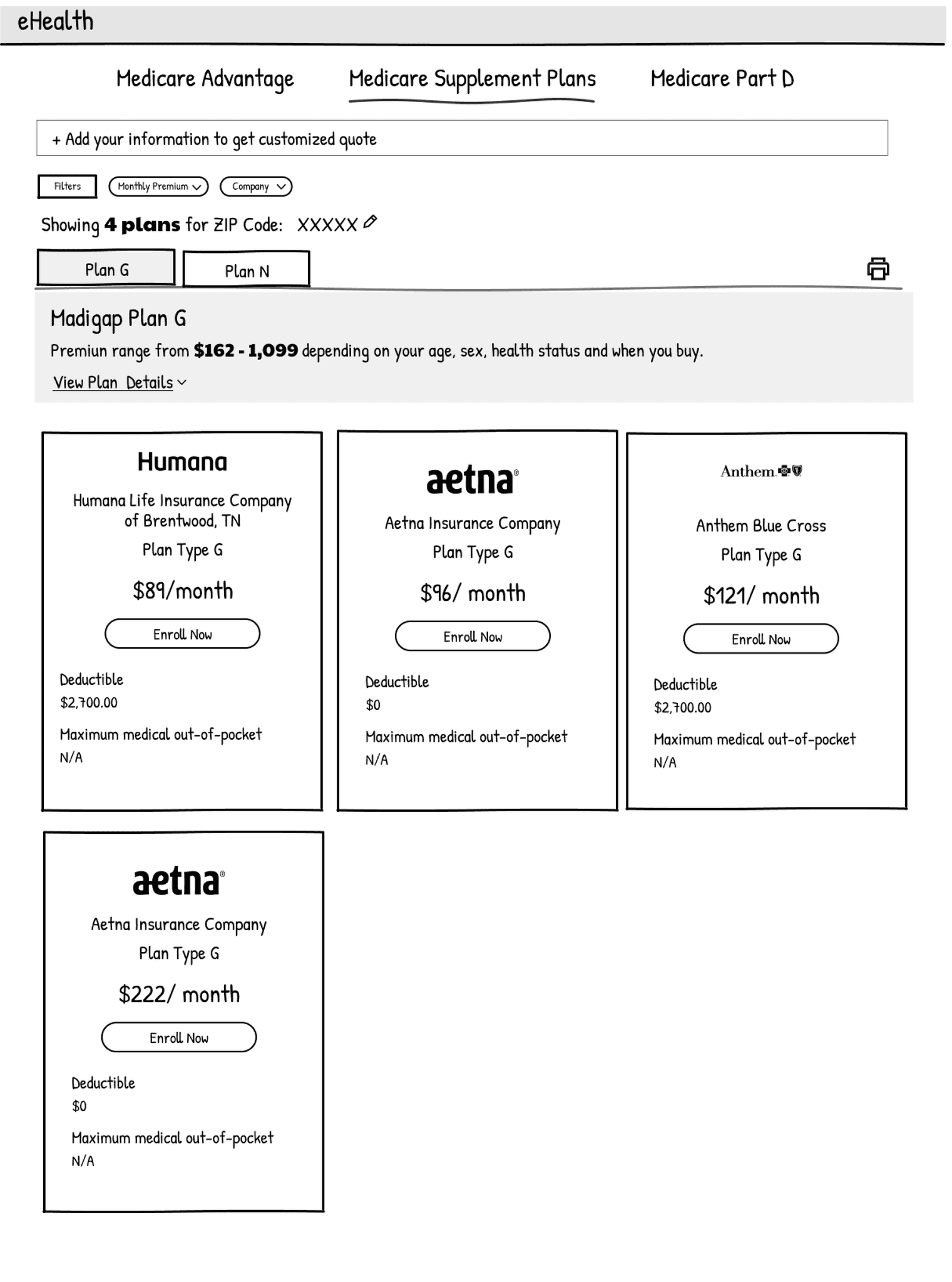
Concept 2: plan tabs with carrier cards
02

Plan tabs with carrier cards

Users switch between plan types while browsing available carrier options.

Concept 3: comparison matrix
03

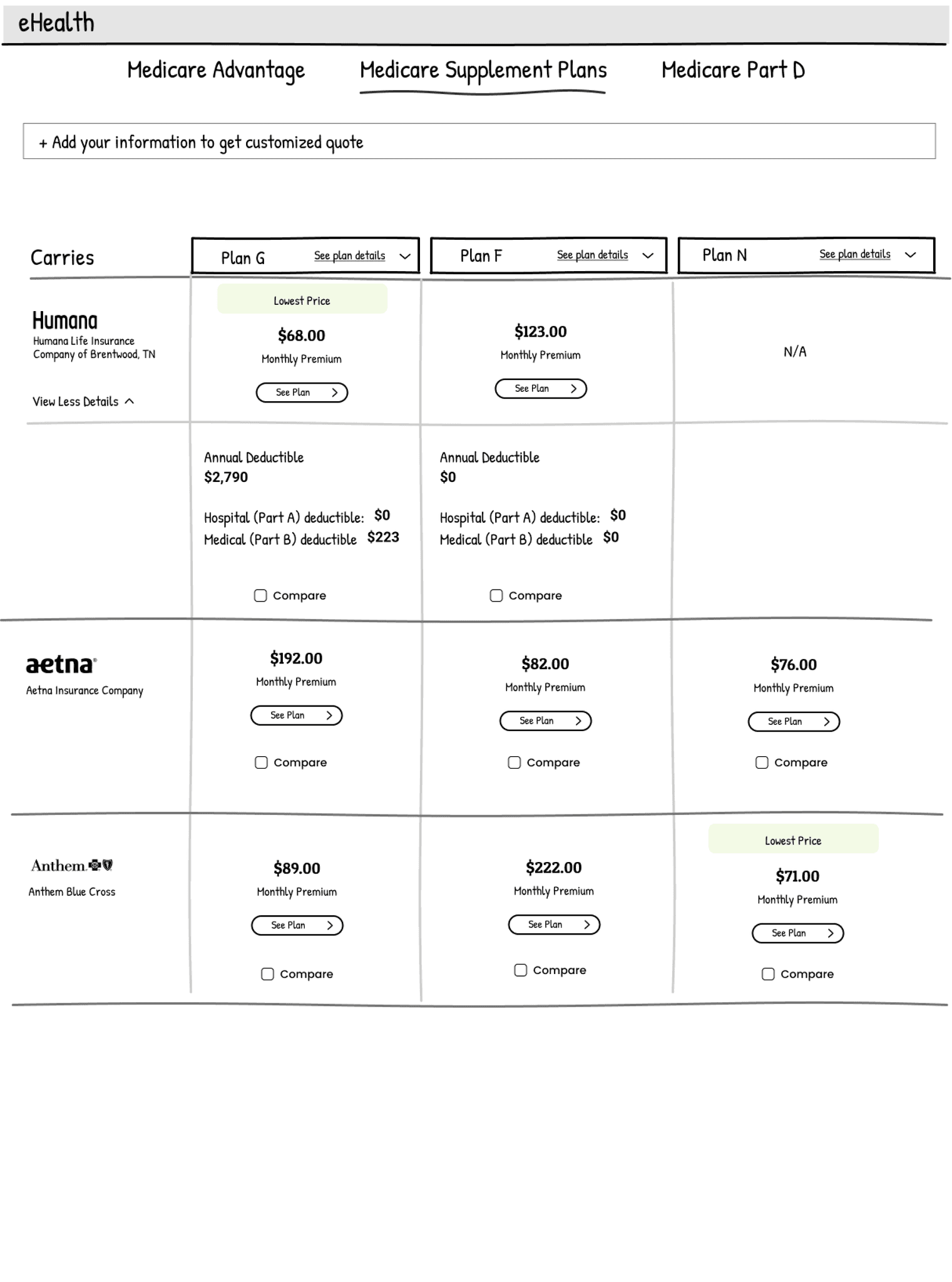
Comparison matrix

Users compare carriers and plan types side by side, with prices and coverage details in one matrix.

Plan-card study

Shoppers trusted cards that showed the real price up front

To learn what a plan card needs to show, six shoppers aged 64 to 67 ranked seven Plan G cards from other Medicare websites in 30-minute, one-on-one sessions. All were still working and signing up for Medicare within the next eight months.

The top three cards

1 = most useful7 = least useful

  1. 1

    Sectioned card with icons

    Worked

    Most informative and transparent. Clear sections and “You pay” headers. Color and icons made it inviting.

    Didn’t work

    Long sentences. Discounts were confusing at this stage. Plan details were hard to find.

  2. 2

    Comparison matrix

    Worked

    Easy to compare plans without clicking. Clear sections, with all the important information.

    Didn’t work

    No save, compare, or favorite. Less attractive design.

  3. 3

    Bold price card

    Worked

    A large, bold premium and deductible felt transparent. “All doctors that accept Medicare” was easy to understand.

    Didn’t work

    Missing benefits coverage. “Cost sharing” was an unfamiliar term.

See all seven rankingsCards 4 to 7, and what pulled them down
  1. 4

    Three-section card

    Worked

    Three clear sections, nothing missing. Clear monthly cost, copays, and deductibles. A price range.

    Didn’t work

    A lot to read. Felt “sterile.”

  2. 5

    Percentage-based card

    Worked

    None noted

    Didn’t work

    Missing deductible and copay amounts. Percentages were harder to process.

  3. 6

    Partial-information card

    Worked

    None noted

    Didn’t work

    Felt incomplete. Unclear what was clickable. Plan name and details were hard to find.

  4. 7

    Sparse card

    Worked

    None noted

    Didn’t work

    Empty space suggested the plan details were missing.

Keep it visible

New to Medicare, participants wanted three reminders on every card

  • Choose any doctor or hospital that accepts Medicare
  • See specialists without referrals
  • Coverage across the United States

Expecting 8 to 10 plans to choose from, they preferred informative cards over minimal ones, so they wouldn’t have to open every plan’s details to find key coverage.

04 LearnInsights

Four insights that changed the roadmap

  1. 01

    Lead with personalized pricing

    Accurate pricing needed to feel central, not like an optional extra.

  2. 02

    Separate required information from filters

    Filters above the census form distracted shoppers and increased abandonment.

  3. 03

    Keep important actions visible

    Pricing controls and next steps needed to remain easy to find.

  4. 04

    Explain discounts in context

    Household-discount messaging needed clearer language and guidance.

05 DeliverDesign solution

MVP 1: A single-page plan comparison

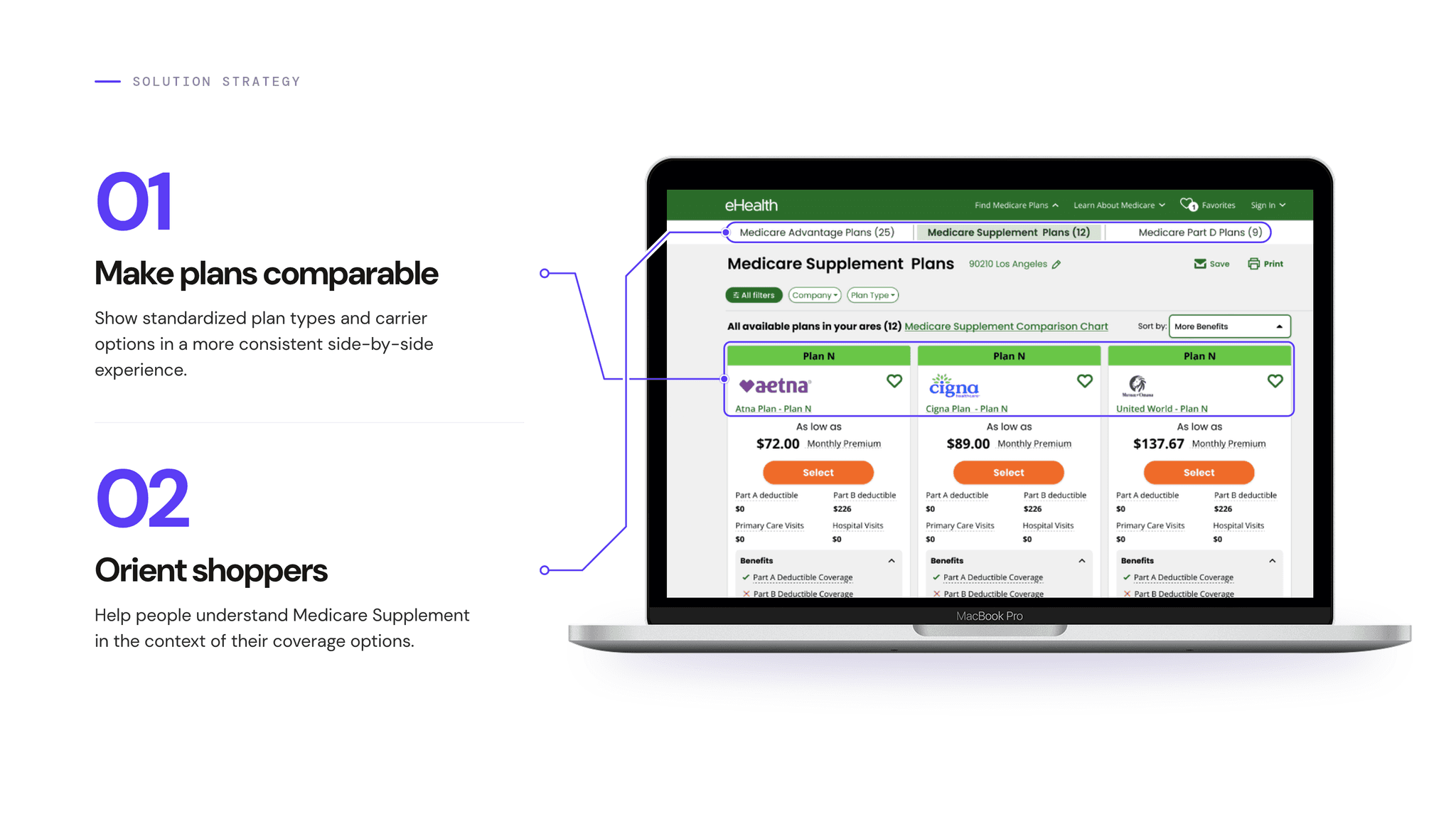
Given the platform’s technical constraints, we designed MVP 1 to display all available plans on one page. We organized the experience by plan type and carrier, with filters, pricing, and comparison details in one place. This gave shoppers a consistent way to review their options within the existing platform.

Solution strategy 01 Make plans comparable and 02 Orient shoppers, shown on the plan comparison page
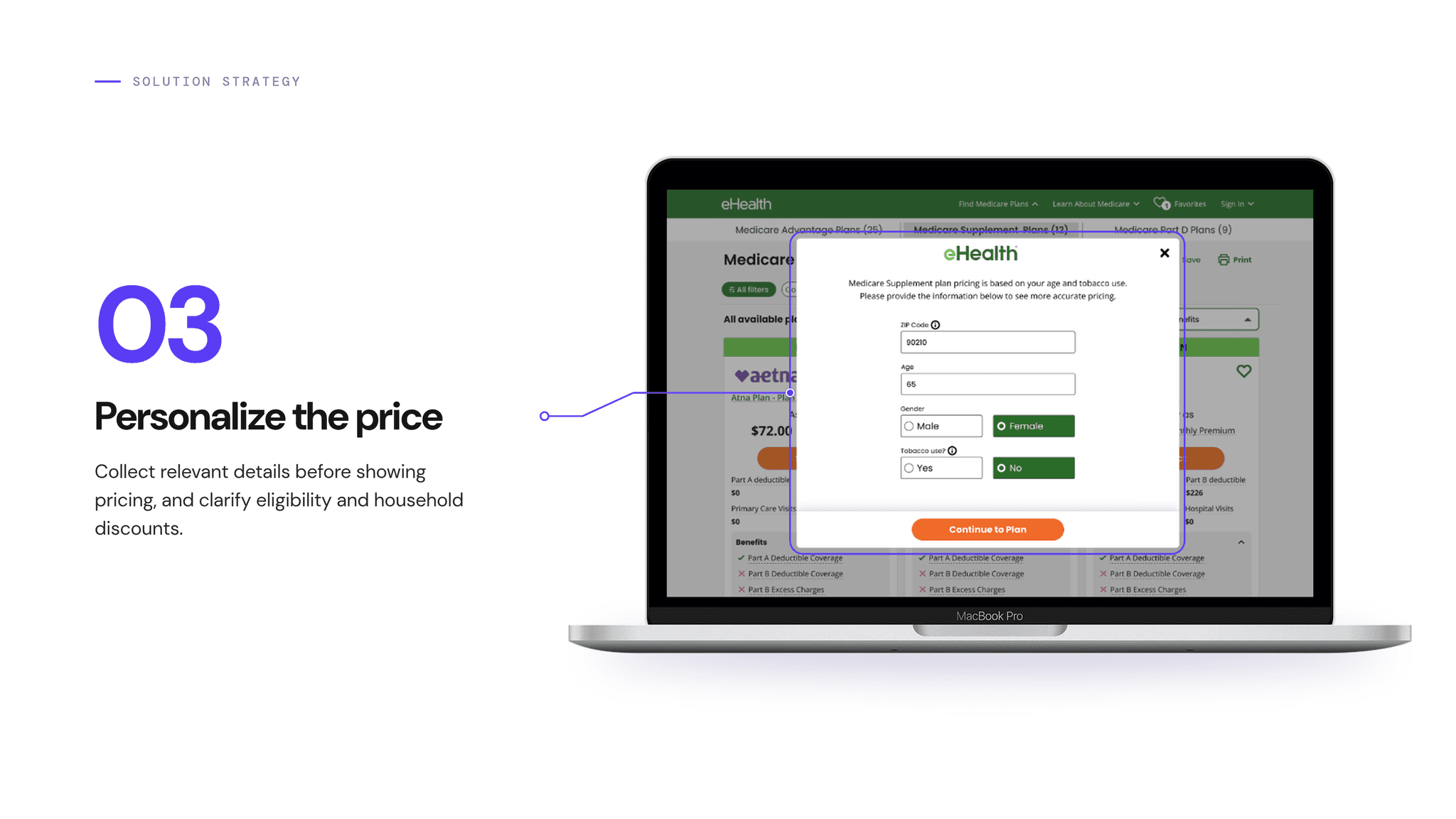
Solution strategy 03 Personalize the price, shown with the pricing details form
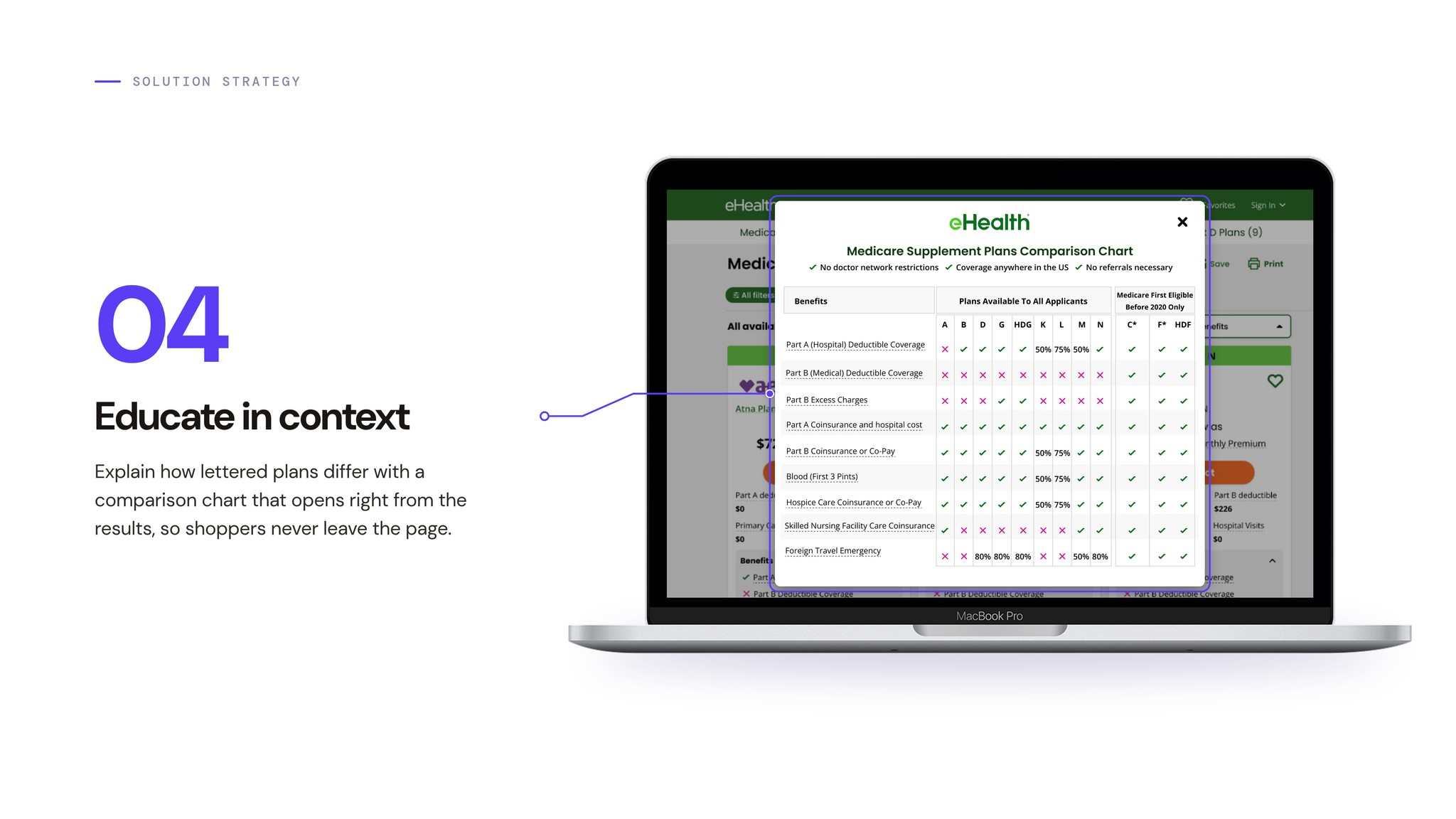
Solution strategy 04 Educate in context, shown with the plan comparison chart

06 ResultsImpact

More plans, fully online

More shoppers could move from comparing Medicare Supplement options to completing an application online.

+230%
YoY growth in plans supporting full online enrollment
296%
YoY growth in online enrollment (OLU) conversions
46
States with fully digital enrollment
79%
Of plans with online applications (99 of 126)
  1. Compare plans
  2. Review plans
  3. Apply online

Next step

Create a more personalized, educational experience

With the comparison foundation in place, the next phase is an educational experience that explains plan types and key differences before shoppers compare options, helping them understand what they’re choosing and make more informed decisions.